【UE4C++-ActionRougelike-17】游戏标签
一、禁止同时执行多种Action
1、添加游戏标签
在行为组件MyActionComponent中添加标签容器用来表示当前已经被激活的游戏标签
//MyActionComponent.h
UPROPERTY(EditAnywhere, BlueprintReadWrite, Category = "Tags")
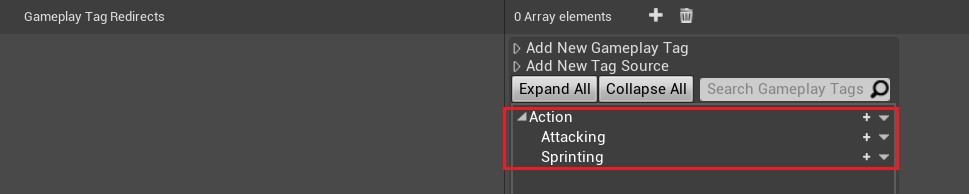
FGameplayTagContainer ActiveGameplayTags;在Edit->Project Settings->GameplayTags中添加标签:Sprinting和Attacking
2、执行和停止Action时添加和删除游戏标签
在MyAction中添加两个标签容器GrantsTags和BlockedTags,分别表示已添加的Action和冲突的Action。并提供了一些用于检查和控制UMyAction的函数:IsRunning():UMyAction是否正在运行;CanStart(AActor* Instigator):UMyAction是否可以开始。
class ACTIONROGUELIKE_API UMyAction : public UObject
{
protected:
    //用于获取拥有UMyAction实例的组件
    UFUNCTION(BlueprintCallable, Category = "Action")
    UMyActionComponent* GetOwningComponent() const;
    //UMyAction启动时添加到拥有UMyAction实例的角色中的标签,UMyAction停止时将其删除
    UPROPERTY(EditDefaultsOnly, Category = "Tags")
    FGameplayTagContainer GrantsTags;
    //UMyAction只能在拥有UMyAction实例的角色没有这些标签的情况下启动
    UPROPERTY(EditDefaultsOnly, Category = "Tags")
    FGameplayTagContainer BlockedTags;
    //表示UMyAction是否正在运行
    bool bIsRunning;
public:
    //表示UMyAction的开始,由Instigator角色调用
    UFUNCTION(BlueprintNativeEvent, Category = "Action")
    void StartAction(AActor* Instigator);
    //表示UMyAction的停止,由Instigator角色调用
    UFUNCTION(BlueprintNativeEvent, Category = "Action")
    void StopAction(AActor* Instigator);
    //返回一个布尔值,表示UMyAction是否正在运行
    UFUNCTION(BlueprintCallable, Category = "Action")
    bool IsRunning() const;
    //用于检查UMyAction是否可以开始
	UFUNCTION(BlueprintNativeEvent, Category = "Action")
	bool CanStart(AActor* Instigator);
}
在MyAction.cpp中修改开始和结束Action方法,能够正确更新当前的MyAction所属MyActionComponent组件的ActiveGameplayTags;并且给出IsRunning()和CanStart(AActor* Instigator)方法的实现。
void UMyAction::StartAction_Implementation(AActor* Instigator)
{
	UE_LOG(LogTemp, Log, TEXT("Running: %s"), *GetNameSafe(this));
	// 将GrantsTags添加到拥有UMyAction实例的角色中
	UMyActionComponent* Comp = GetOwningComponent();
	Comp->ActiveGameplayTags.AppendTags(GrantsTags);
	// 将bIsRunning设置为true,表示UMyAction正在运行
	bIsRunning = true;
}
void UMyAction::StopAction_Implementation(AActor* Instigator)
{
	UE_LOG(LogTemp, Log, TEXT("Stopped: %s"), *GetNameSafe(this));
	ensureAlways(bIsRunning);
	// 从拥有UMyAction实例的角色中移除GrantsTags
	UMyActionComponent* Comp = GetOwningComponent();
	Comp->ActiveGameplayTags.RemoveTags(GrantsTags);
	// 将bIsRunning设置为false,表示UMyAction已停止运行
	bIsRunning = false;
}
//用于检查UMyAction是否可以开始。如果UMyAction正在运行或拥有UMyAction实例的角色有被阻止启动的标签,则返回false,否则返回true。
bool UMyAction::CanStart_Implementation(AActor* Instigator)
{
	// 如果UMyAction正在运行,返回false(正在攻击时不能再次攻击)
	if (IsRunning())
	{
		return false;
	}
	UMyActionComponent* Comp = GetOwningComponent();
	// 如果拥有UMyAction实例的角色有任何一个BlockedTags,则返回false
	if (Comp->ActiveGameplayTags.HasAny(BlockedTags))
	{
		return false;
	}
	// 如果UMyAction不在运行状态且拥有UMyAction实例的角色没有BlockedTags,则返回true
	return true;
}
//用于获取UMyAction实例所在的世界,通过查询其所在的容器对象来实现
UWorld* UMyAction::GetWorld() const
{
    // 获取该对象所在的容器对象
	UActorComponent* Comp = Cast<UActorComponent>(GetOuter());
	if (Comp)
	{
        // 如果容器对象为 UActorComponent 类型,就返回其所在的世界的指针
		return Comp->GetWorld();
	}
    // 如果无法获取到容器对象或者世界的指针,则返回 nullptr
	return nullptr;
}
//在UMyAction实例中可以通过该函数获取其所属的UMyActionComponent实例
UMyActionComponent* UMyAction::GetOwningComponent() const
{
	return Cast<UMyActionComponent>(GetOuter());
}
bool UMyAction::IsRunning() const
{
	return bIsRunning;
}
在四种Action蓝图中修改其Tags中的Grants Tags和Blocked Tags。
- 三种攻击Action执行时,会将Attacking加入到GrantsTags中,同时将Sprinting和Attacking加入到BlockedTags中表示进行某种攻击Action时,禁止加速和其他攻击。
- 当加速Action执行时,会将Sprinting加入到GrantsTags中,同时将Attacking加入到BlockedTags表示加速时禁止攻击。

3、对Action的启动和停止前进行检查
在MyActionComponent.cpp中修改StartActionByName和StopActionByName,启动动作前检查该动作是否能够启动;删除动作前检查该动作是否已启动。
bool UMyActionComponent::StartActionByName(AActor* Instigator, FName ActionName)
{
	// 遍历 Actions 数组,查找并运行指定名称ActionName的动作
	for (UMyAction* Action : Actions)
	{
		if (Action && Action->ActionName == ActionName)
		{
			// 检查该动作是否可以启动
			if (!Action->CanStart(Instigator))
			{
				// 如果无法启动,输出错误信息,并继续查找下一个动作
				FString FailedMsg = FString::Printf(TEXT("Failed to run: %s"), *ActionName.ToString());
				GEngine->AddOnScreenDebugMessage(-1, 2.0f, FColor::Red, FailedMsg);
				continue;
			}
			Action->StartAction(Instigator);
			return true;
		}
	}
	return false;
}
bool UMyActionComponent::StopActionByName(AActor* Instigator, FName ActionName)
{
	// 遍历 Actions 数组,查找并停止指定名称的动作
	for (UMyAction* Action : Actions)
	{
		if (Action && Action->ActionName == ActionName)
		{
             //如果Action已启动,则可以停止
			if (Action->IsRunning())
			{
				Action->StopAction(Instigator);
				return true;
			}
		}
	}
	return false;
}
4、效果演示
可以看到在执行冲刺时,再点击射击会执行失败,执行魔法攻击时,再执行冲刺和其他的攻击也会失败
二、钥匙卡系统
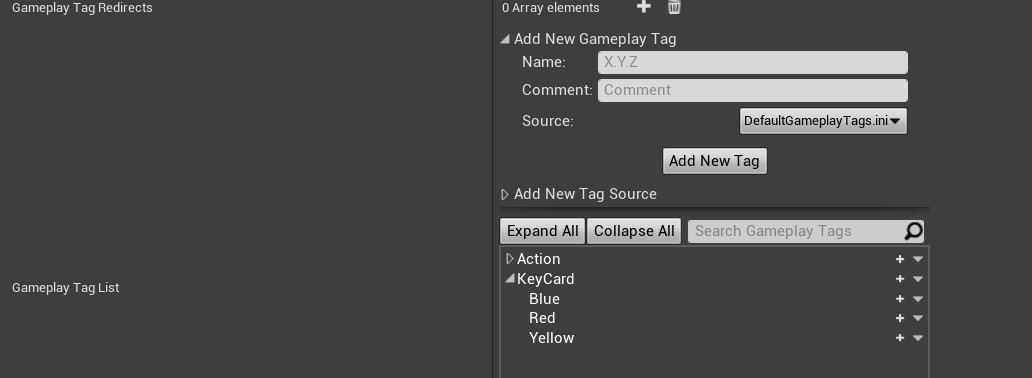
1、添加钥匙卡标签
2、获取钥匙卡
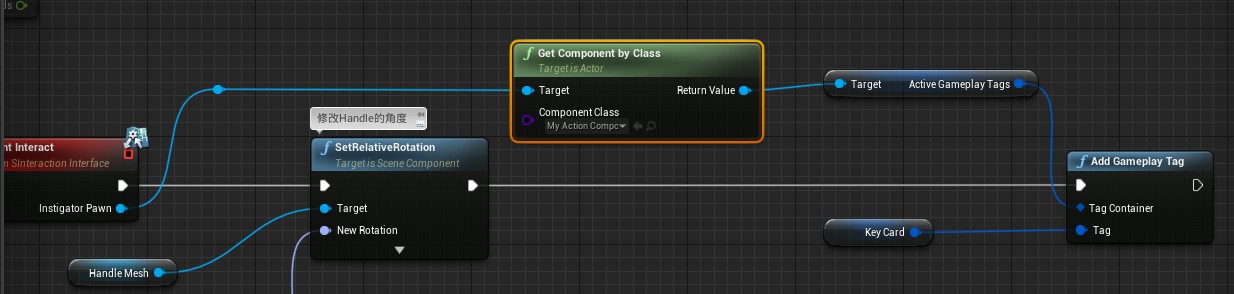
在先前的Lever_BP中添加获取钥匙卡的逻辑
3、打开宝箱
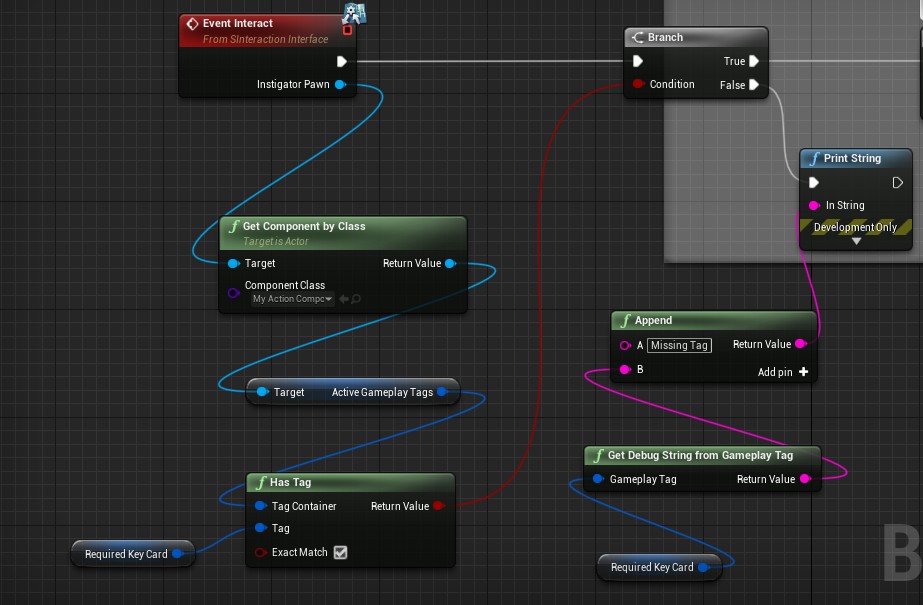
在TreasureChest_BP中添加打开宝箱时验证钥匙卡的逻辑
4、效果演示
在地图中的开关按钮设置了KeyCard变量为Blue,左边箱子的RequiredKeyCard设置为了Blue,右边箱子为Red。这样在打开开关获取了Blue的KeyCard后我们就能够打开左边的箱子。
三、反弹攻击
1、添加反弹攻击标签
- 在Edit->Project Settings->GameplayTags中添加标签:Status.Parrying
- 在Edit->Project Settings->Input中绑定反弹攻击的按键输入
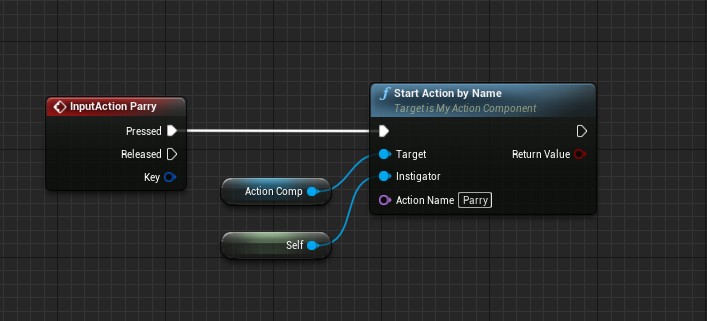
- 在PlayerCharacter_BP中编写按键反弹攻击后调用反弹攻击Action
2、创建反弹攻击能力
以MyAction为父类创建反弹伤害能力蓝图类Action_Parry
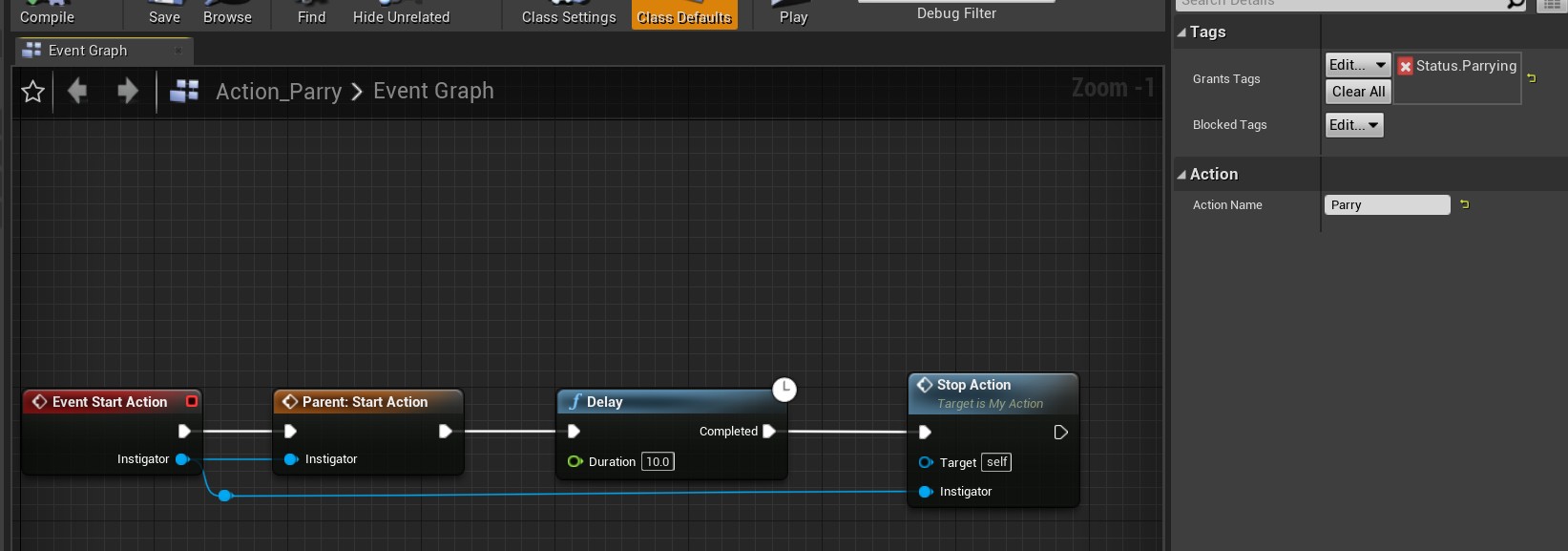
3、添加反弹攻击逻辑
在MyMagicProjectile.h中添加ParryTag表示反弹攻击的标签,要在MyMagicProjectile对应蓝图中选择ParryTag为Status.Parrying。
UPROPERTY(EditDefaultsOnly, Category = "Damage")
FGameplayTag ParryTag;
在MyMagicProjectile.cpp中修改OnActorOverlap()方法,判断当前被击中的Actor是否拥有UMyActionComponent中的ParryTag标签(Status.Parrying),如果有,则反弹此次伤害;否则继续执行下面的Explode()方法。
void AMyMagicProjectile::OnActorOverlap(UPrimitiveComponent* OverlappedComponent, AActor* OtherActor, UPrimitiveComponent* OtherComp, int32 OtherBodyIndex, bool bFromSweep, const FHitResult& SweepResult)
{
    // 如果重叠的物体不是发射该魔法弹道的角色本身
	if (OtherActor && OtherActor != GetInstigator())
	{
        // 查找该物体是否具有 UMyActionComponent 组件,并且 ActiveGameplayTags 是否包含 ParryTag 标签
		UMyActionComponent* ActionComp = Cast<UMyActionComponent>(OtherActor->GetComponentByClass(UMyActionComponent::StaticClass()));
		if (ActionComp && ActionComp->ActiveGameplayTags.HasTag(ParryTag))
		{
            // 如果找到了具有 ParryTag 标签的 UMyActionComponent 组件,反弹该魔法弹道
			MoveComp->Velocity = -MoveComp->Velocity;
            // 设置新的发射者为重叠的物体
			SetInstigator(Cast<APawn>(OtherActor));
			return;
		}
        // 对重叠的物体施加方向性伤害,如果该物体受到伤害,则执行 Explode() 函数
		if (UMyGameplayFunctionLibrary::ApplyDirectionalDamage(GetInstigator(), OtherActor, DamageAmount, SweepResult))
		{
			Explode();
		}
	}
}
4、效果演示