【UE4C++-ActionRougelike-16】游戏能力系统
一、加速能力
1、新建能力组件类
以Actor Component为父类创建能力组件类MyActionComponent,能力组件包含一个能力数组用于存储当前所拥有的能力,以及添加动作、启动动作、停止动作三个方法
UCLASS( ClassGroup=(Custom), meta=(BlueprintSpawnableComponent) )
class ACTIONROGUELIKE_API UMyActionComponent : public UActorComponent
{
	GENERATED_BODY()

public:
	UFUNCTION(BlueprintCallable, Category = "Actions")
	void AddAction(TSubclassOf<UMyAction> ActionClass);

	UFUNCTION(BlueprintCallable, Category = "Actions")
	bool StartActionByName(AActor* Instigator, FName ActionName);

	UFUNCTION(BlueprintCallable, Category = "Actions")
	bool StopActionByName(AActor* Instigator, FName ActionName);

	UMyActionComponent();

protected:
    // 声明一个保存动作指针的数组
	UPROPERTY()
	TArray<UMyAction*> Actions;

	virtual void BeginPlay() override;
public:
	virtual void TickComponent(float DeltaTime, ELevelTick TickType, FActorComponentTickFunction* ThisTickFunction) override;
};
在MyActionComponent.cpp中实现添加动作、启动动作、停止动作方法。
// 添加动作
void UMyActionComponent::AddAction(TSubclassOf<UMyAction> ActionClass)
{
	if (!ensure(ActionClass))
	{
		return;
	}
	// 创建一个新的动作对象添加到 Actions 数组中
	UMyAction* NewAction = NewObject<UMyAction>(this, ActionClass);
	if (ensure(NewAction))
	{
		Actions.Add(NewAction);
	}
}

//根据名称启动一个动作
bool UMyActionComponent::StartActionByName(AActor* Instigator, FName ActionName)
{
	// 遍历 Actions 数组,查找并运行指定名称ActionName的动作
	for (UMyAction* Action : Actions)
	{
		if (Action && Action->ActionName == ActionName)
		{
			Action->StartAction(Instigator);
			return true;
		}
	}
	return false;
}

//根据名称停止一个动作
bool UMyActionComponent::StopActionByName(AActor* Instigator, FName ActionName)
{
	// 遍历 Actions 数组,查找并停止指定名称的动作
	for (UMyAction* Action : Actions)
	{
		if (Action && Action->ActionName == ActionName)
		{
			Action->StopAction(Instigator);
			return true;
		}
	}
	return false;
}
2、创建加速能力
2.1 创建能力类基类
以UObject为父类创建能力类基类MyAction,包含动作的名字属性和开始动作,停止动作方法。
UCLASS(Blueprintable)	// 声明UMyAction为一个可蓝图化的类,用于UE蓝图系统
class ACTIONROGUELIKE_API UMyAction : public UObject
{
	GENERATED_BODY()
public:
	UFUNCTION(BlueprintNativeEvent, Category = "Action")
	void StartAction(AActor* Instigator);

	UFUNCTION(BlueprintNativeEvent, Category = "Action")
	void StopAction(AActor* Instigator);

	UPROPERTY(EditDefaultsOnly, Category = "Action")
	FName ActionName;
};
在MyAction.cpp中给出能力类基类中开始动作,停止动作方法的实现
void UMyAction::StartAction_Implementation(AActor* Instigator)
{
	UE_LOG(LogTemp, Log, TEXT("Running: %s"), *GetNameSafe(this));
}

void UMyAction::StopAction_Implementation(AActor* Instigator)
{
	UE_LOG(LogTemp, Log, TEXT("Stopped: %s"), *GetNameSafe(this));
}
2.2 创建加速能力类
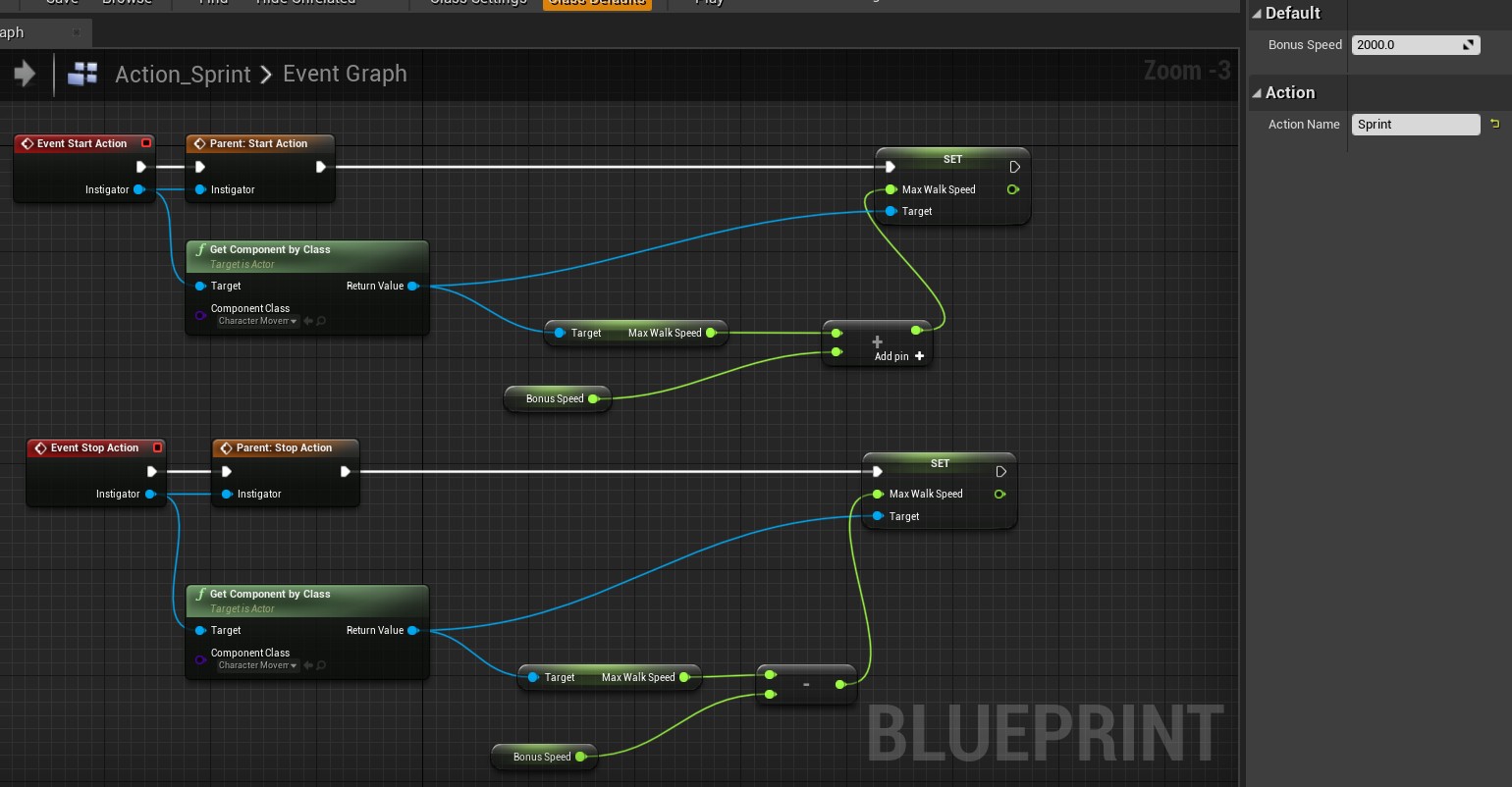
以MyAction为父类创建加速能力蓝图类Action_Sprint,并设置类的属性Action Name为Sprint。
3、为角色添加能力
在MyCharacter中添加能力组件,并绑定相应按键来使用各种能力。
//MyCharacter.h中添加能力组件
UPROPERTY(VisibleAnywhere, BlueprintReadOnly, Category = "Components")
UMyActionComponent* ActionComp;

//MyCharacter.cpp
//构造函数中初始化能力组
ActionComp = CreateDefaultSubobject<UMyActionComponent>("ActionComp");
//SetupPlayerInputComponent中绑定加速的按键输入事件和响应函数
PlayerInputComponent->BindAction("Sprint", IE_Pressed, this, &AMyCharacter::SprintStart);
PlayerInputComponent->BindAction("Sprint", IE_Released, this, &AMyCharacter::SprintStop);
//开始加速
void AMyCharacter::SprintStart()
{
	ActionComp->StartActionByName(this, "Sprint");
}
//停止加速
void AMyCharacter::SprintStop()
{
	ActionComp->StopActionByName(this, "Sprint");
}
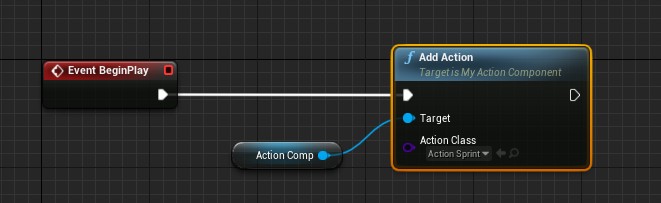
在PlayerCharacter_BP中对Action_Sprint进行添加
4、效果演示
二、攻击能力
1、创建攻击能力类
1.1 创建攻击能力基类
以MyAction为父类创建攻击能力类MyAction_ProjectileAttack,根据之前在MyCharacter中的攻击部分代码移动到这里。具体有发射物的类别、手部socket(发射物的生成点)、攻击动画、生成发射物函数等。
class ACTIONROGUELIKE_API UMyAction_ProjectileAttack : public UMyAction
{
	GENERATED_BODY()
protected:
	//发射的 Projectile 类型
	UPROPERTY(EditAnywhere, Category = "Attack")
	TSubclassOf<AActor> ProjectileClass;
	//手部的 socket 名称
	UPROPERTY(VisibleAnywhere, Category = "Effects")
	FName HandSocketName;
	//攻击动画的延迟
	UPROPERTY(EditDefaultsOnly, Category = "Attack")
	float AttackAnimDelay;
	//攻击动画
	UPROPERTY(EditAnywhere, Category = "Attack")
	UAnimMontage* AttackAnim;

	//攻击时播放的粒子特效
	UPROPERTY(EditAnywhere, Category = "Attack")
	UParticleSystem* CastingEffect;
	//攻击动画延迟结束后调用
	UFUNCTION()
	void AttackDelay_Elapsed(ACharacter* InstigatorCharacter);

public:
	//用于实现该功能类具体功能的函数
	virtual void StartAction_Implementation(AActor* Instigator) override;

	UMyAction_ProjectileAttack();
};
在MyAction_ProjectileAttack.cpp对父类的StartAction进行重写,实现具体的攻击能力,主要负责攻击抛射物生成前的粒子效果的生成和动画的播放;实现AttackDelay_Elapsed方法,在适当的位置生成抛射物类。
UMyAction_ProjectileAttack::UMyAction_ProjectileAttack()
{
	HandSocketName = "Muzzle_01";
	AttackAnimDelay = 0.2f;
}
//实现攻击能力的逻辑
void UMyAction_ProjectileAttack::StartAction_Implementation(AActor* Instigator)
{
	Super::StartAction_Implementation(Instigator);
	// 如果 Instigator 是 ACharacter 类型,则进行攻击
	ACharacter* Character = Cast<ACharacter>(Instigator);
	if (Character)
	{
		//播放攻击动画
		Character->PlayAnimMontage(AttackAnim);
		// 在手部 socket 上播放粒子特效
		UGameplayStatics::SpawnEmitterAttached(CastingEffect, Character->GetMesh(), HandSocketName, FVector::ZeroVector, FRotator::ZeroRotator, EAttachLocation::SnapToTarget);
		// 创建一个定时器,在攻击动画延迟之后调用 AttackDelay_Elapsed 函数
		FTimerHandle TimerHandle_AttackDelay;
		FTimerDelegate Delegate;
		Delegate.BindUFunction(this, "AttackDelay_Elapsed", Character);
		GetWorld()->GetTimerManager().SetTimer(TimerHandle_AttackDelay, Delegate, AttackAnimDelay, false);
	}
}
//在攻击动画延迟之后调用,生成弹道攻击的 Projectile 对象
void UMyAction_ProjectileAttack::AttackDelay_Elapsed(ACharacter* InstigatorCharacter)
{
	if (ensureAlways(ProjectileClass))
	{
		// 获取手部 socket 的位置
		FVector HandLocation = InstigatorCharacter->GetMesh()->GetSocketLocation(HandSocketName);
		// 设置生成 Projectile 对象的参数
		FActorSpawnParameters SpawnParams;
		SpawnParams.SpawnCollisionHandlingOverride = ESpawnActorCollisionHandlingMethod::AlwaysSpawn;
		SpawnParams.Instigator = InstigatorCharacter;
		// 设置碰撞形状
		FCollisionShape Shape;
		Shape.SetSphere(20.0f);
		// 设置碰撞查询参数
		FCollisionQueryParams Params;
		Params.AddIgnoredActor(InstigatorCharacter);
		// 设置碰撞对象查询参数
		FCollisionObjectQueryParams ObjParams;
		ObjParams.AddObjectTypesToQuery(ECC_WorldDynamic);
		ObjParams.AddObjectTypesToQuery(ECC_WorldStatic);
		ObjParams.AddObjectTypesToQuery(ECC_Pawn);
		// 获取 TraceStart 和 TraceEnd,用于进行碰撞检测
		FVector TraceStart = InstigatorCharacter->GetPawnViewLocation();
		FVector TraceEnd = TraceStart + (InstigatorCharacter->GetControlRotation().Vector() * 5000);
		// 进行碰撞检测,如果发生碰撞,则将 TraceEnd 设置为碰撞点
		FHitResult Hit;
		if (GetWorld()->SweepSingleByObjectType(Hit, TraceStart, TraceEnd, FQuat::Identity, ObjParams, Shape, Params))
		{
			TraceEnd = Hit.ImpactPoint;
		}
		// 根据 TraceEnd 和 HandLocation 计算生成 Projectile 对象的旋转
		FRotator ProjRotation = FRotationMatrix::MakeFromX(TraceEnd - HandLocation).Rotator();
		// 设置生成 Projectile 对象的位置和旋转
		FTransform SpawnTM = FTransform(ProjRotation, HandLocation);
		// 生成 Projectile 对象
		GetWorld()->SpawnActor<AActor>(ProjectileClass, SpawnTM, SpawnParams);
	}
	// 停止攻击
	StopAction(InstigatorCharacter);
}
1.2 创建魔法攻击能力类
以MyAction_ProjectileAttack为父类创建蓝图类Action_MagicProjectile,并设置其蓝图参数。
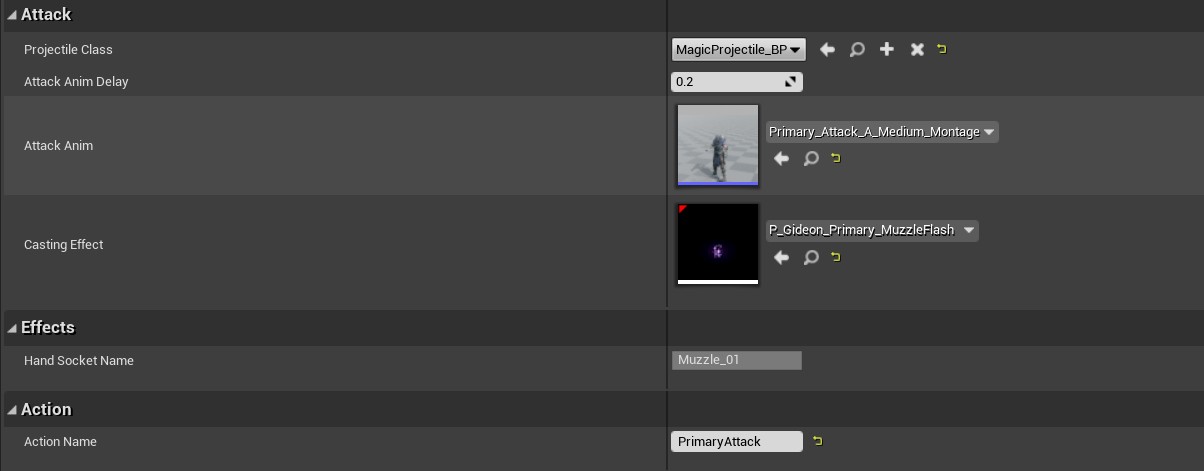
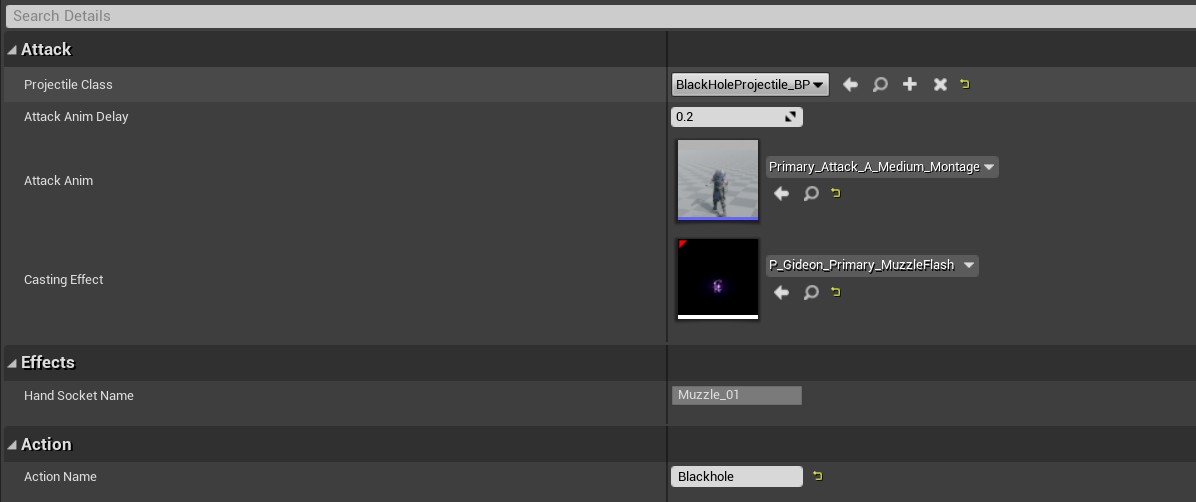
1.3 创建黑洞攻击能力类
以MyAction_ProjectileAttack为父类创建蓝图类Action_BlackHole,并设置其蓝图参数。
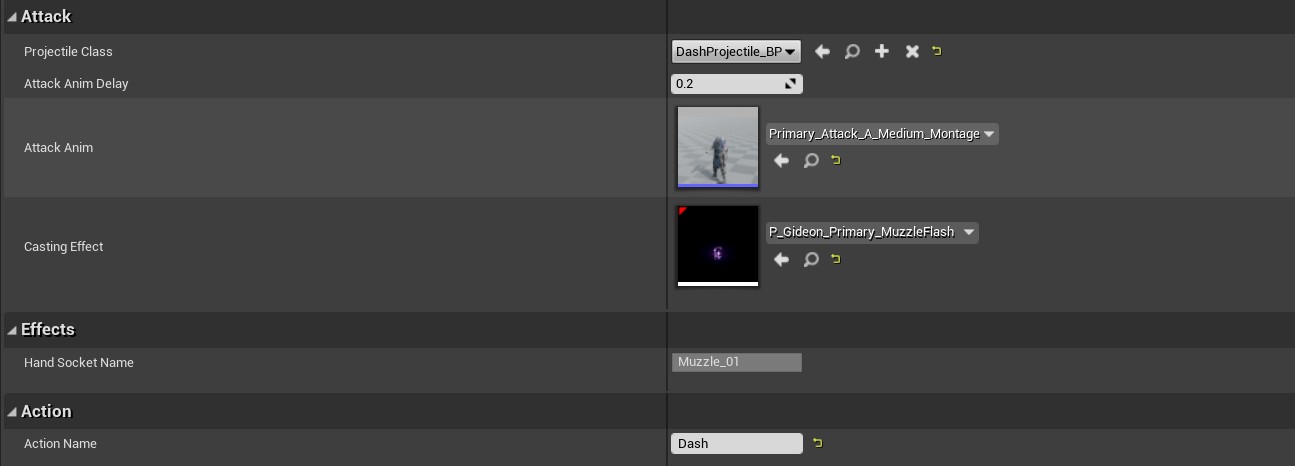
1.4创建闪现攻击能力类
以MyAction_ProjectileAttack为父类创建蓝图类Action_Dash,并设置其蓝图参数。
2、为角色添加能力
在MyCharacter中修改发射不同抛物体攻击方法。通过属性组件ActionComp的StartActionByName方法调用不同的攻击能力类。
void AMyCharacter::PrimaryAttack()
{
	ActionComp->StartActionByName(this, "PrimaryAttack");
}
void AMyCharacter::Dash()
{
	ActionComp->StartActionByName(this, "Dash");
}
void AMyCharacter::BlackHoleAttack()
{
	ActionComp->StartActionByName(this, "Blackhole");
}
3、初始加载默认能力
在MyActionComponent中创建初始加载能力类数组,并将角色初始应拥有的能力添加到数组中。
//MyActionComponent.h
//初始默认加载的能力类数组
UPROPERTY(EditAnywhere, Category = "Actions")
TArray<TSubclassOf<USAction>> DefaultActions;

//MyActionComponent.cpp
void UMyActionComponent::BeginPlay()
{
	Super::BeginPlay();
	// 遍历 DefaultActions 数组,将其中的每个能力添加到 Actions 数组中
	for (TSubclassOf<UMyAction> ActionClass : DefaultActions)
	{
		AddAction(ActionClass);
	}
}
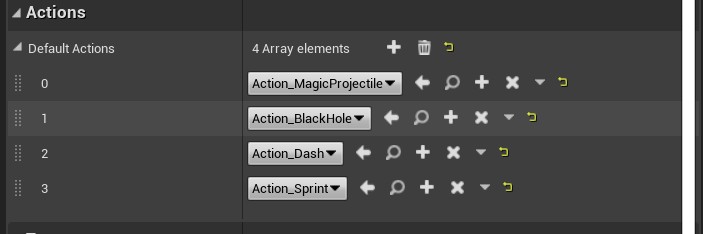
在PlayerCharacter_BP的能力组件中设置角色的初始能力类数组